2 in 1 Tree Vector Illustrations for Creative Projects
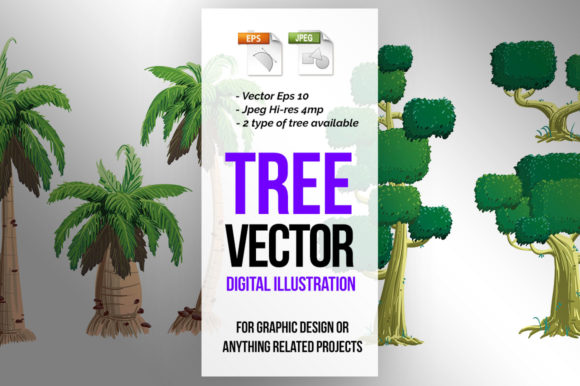
Nature remains one of the most enduring and versatile themes in visual design, yet finding assets that balance artistic charm with technical flexibility can be a challenge. The 2 in 1 Tree Vector Illustrations package addresses this specific need by providing dual stylistic variations within a single, cohesive collection. Rather than offering a generic assortment of unrelated flora, this resource focuses on two distinct tree types rendered in a unified aesthetic. This intentional consistency allows designers, educators, and content creators to build environments that feel curated rather than chaotic. Whether you are developing an indie game, designing classroom worksheets, or branding an eco-friendly product, having access to scalable vector art ensures your visuals remain crisp across every medium.
Understanding the Technical Advantage
The foundation of any reliable design asset is its technical specification. This collection is delivered in EPS 10 format, which serves as an industry standard for compatibility. Unlike newer formats that may require the latest software updates, EPS 10 opens seamlessly in Adobe Illustrator, CorelDRAW, Affinity Designer, and even older versions of vector editing tools. This backward compatibility is crucial for freelancers and agencies working across different hardware setups or collaborating with clients who may not have upgraded their creative suites recently.
Resolution independence is another critical factor. Because these are true vectors, you can scale a small sapling for a business card or expand a full canopy for a billboard without losing edge definition. For users who prefer raster workflows or need immediate previews, the inclusion of minimum 2000x2000 pixel pre-rendered JPEGs provides a high-quality fallback. These 4MP images are substantial enough for web use, digital presentations, and moderate print applications, allowing you to visualize the composition before committing to vector editing. This hybrid delivery method respects both the precision needs of professional designers and the speed requirements of marketers and educators.
Applications in Game Development and Interactive Media
For indie developers and UI designers, environmental assets often consume the majority of production time. The 2 in 1 Tree Vector Illustrations serve as excellent building blocks for 2D platformers, point-and-click adventures, or mobile puzzle games. The "2 in 1" aspect is particularly valuable here because it provides visual variety without breaking immersion. You can populate a forest level with Type A trees for the foreground and Type B trees for the background, creating depth through style differentiation while maintaining a consistent color palette and line weight.
Vectors also offer unique advantages for game optimization. Instead of importing heavy texture files, developers can export these trees at exact resolutions needed for specific device screens. If you are building a responsive web game, SVG exports from these files ensure sharp graphics on retina displays without bloating load times. Furthermore, the clean paths make it easy to separate elements like trunks, branches, and leaves. This modularity allows animators to create swaying effects or seasonal transitions by simply swapping leaf colors or adjusting anchor points, significantly reducing the asset footprint compared to frame-by-frame animation.
Educational Resources and Kids Activities
Educators and parents seeking engaging learning materials will find these illustrations exceptionally practical. In early childhood education, clear and friendly imagery helps maintain focus. The two distinct tree styles can be used to teach categorization, counting, or seasonal changes. For example, a worksheet might ask children to count the number of Type A trees versus Type B trees, turning a simple observation exercise into an interactive lesson. Because the files are editable, teachers can customize the complexity of the activity based on age groups, perhaps simplifying the shapes for toddlers or adding detailed labels for older students studying botany.
Crafting and activity books also benefit from the scalability of these vectors. You can arrange multiple trees to create a coloring page border, resize them to fit standard paper sizes, or combine them with text to create flashcards. The clean lines typical of vector art reproduce well on home printers, ensuring that DIY educational materials look professional rather than pixelated. For publishers of children’s books or workbooks, owning the vector source means you can adapt the same asset for cover art, interior spot illustrations, and marketing materials without licensing additional stock photography.
Branding and Graphic Design Integration
In commercial design, nature motifs often signal sustainability, growth, or organic quality. However, stock photos can sometimes feel too literal or corporate. These vector illustrations offer a stylized alternative that feels more approachable and bespoke. Marketing agencies can integrate these trees into logos, packaging, or social media templates for clients in the wellness, agriculture, or outdoor sectors. The ability to recolor the vectors instantly allows for seamless alignment with brand guidelines. If a client’s primary color shifts from forest green to teal for a seasonal campaign, the illustration adapts in seconds without requiring a complete redraw.
Consistency is key when building a visual identity system. Using the 2 in 1 Tree Vector Illustrations ensures that all collateral shares the same artistic DNA. A brochure featuring a detailed tree icon will match the website header and the email newsletter signature perfectly. This cohesion builds trust and recognition. Designers can also experiment with opacity and blending modes to create subtle textures or watermarks, adding layers of sophistication to minimalist layouts. The dual variation prevents repetition fatigue in long-form documents or multi-page reports where nature themes are recurrent.
Practical Workflow Recommendations
To maximize the utility of this asset pack, organization and adaptation strategies matter. Start by establishing a naming convention when you import the files into your project. Labeling layers clearly as "Tree_Type_A" and "Tree_Type_B" saves time during future edits. When customizing colors, consider using global swatches or variables within your vector software. This allows you to update the entire scene’s palette simultaneously, which is invaluable when iterating on concepts or adapting designs for dark mode interfaces.
- Layer Separation: Before exporting for games or animation, isolate movable parts. Keep roots, trunks, and foliage on separate layers to facilitate rigging or parallax scrolling.
- Color Harmonization: Use the HSB slider to adjust saturation and brightness uniformly across both tree types. This ensures they look like they belong to the same ecosystem even if their base hues differ.
- Composition Balance: Alternate between the two tree styles to create natural rhythm. Avoid clustering identical shapes, as this creates visual stagnation. Use size variation to reinforce perspective.
- Export Optimization: For web use, simplify paths and remove unused anchor points to reduce file size. For print, ensure stroke widths are scaled appropriately so lines do not disappear at large formats.
While these illustrations provide a strong starting point, true originality comes from how you modify them. Do not hesitate to distort proportions, add custom details like birds or nests, or combine elements from both tree types to create new hybrids. The goal is to treat the vector pack as raw material rather than a finished product. By investing a small amount of time in customization, you transform a stock asset into a signature element of your creative portfolio. This approach not only enhances the uniqueness of your work but also ensures that the final output resonates authentically with your specific audience, whether they are players, students, or customers.