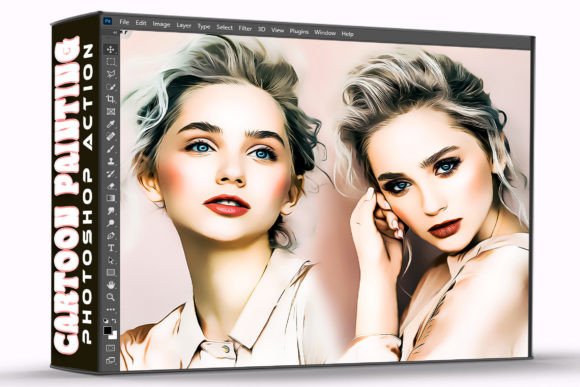
Cartoon Painting Photoshop Action: One-Click Creative Edits
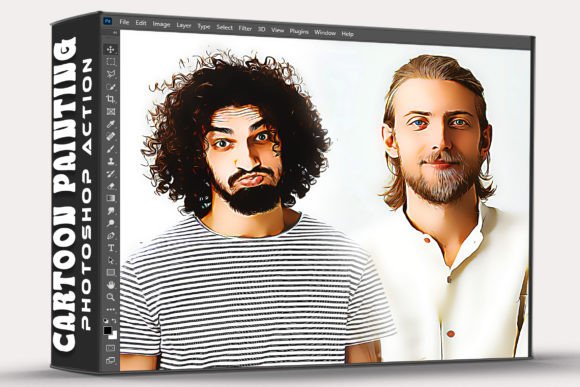
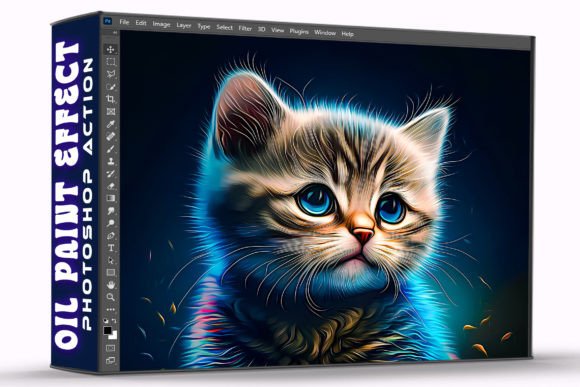
Transforming a standard photograph into a stylized piece of digital art usually requires hours of manual painting, complex layer masking, and advanced brush work. For busy creatives and marketers, that time investment is often a barrier to experimentation. The Cartoon Painting Photoshop Action removes this friction entirely, bridging the gap between raw photography and illustrative art in seconds. This tool is not merely a filter; it is a sophisticated automation script that reconstructs your image using painterly algorithms while retaining the essential composition and focal points of the original shot. By handling the technical heavy lifting, it allows you to focus on artistic direction rather than pixel manipulation.
The true value of this action lies in its ability to serve as a creative catalyst. When you download the action file and install it in Adobe Photoshop, you are acquiring a workflow accelerator. The process is intentionally straightforward: open your photo, play the action, and watch the transformation occur. However, the utility extends far beyond the initial click. Professional results come from understanding how to leverage this automated base as a starting point for unique visual storytelling. Whether you are designing social media assets, creating blog headers, or developing character concepts, this pack provides the foundational texture and style needed to elevate everyday photos into compelling graphics.
Practical Applications Across Creative Disciplines
Different professionals face distinct visual challenges, and the versatility of a cartoon painting effect adapts to various contexts. Understanding these specific use cases helps maximize the return on your creative time.
Social Media and Content Marketing
In crowded digital feeds, realistic photography often blends together. A stylized, painted aesthetic creates an immediate pattern interrupt. Marketers and bloggers can use this action to convert team headshots into approachable, branded avatars that feel less corporate and more human. For lifestyle brands, turning product-in-use photos into soft illustrations can evoke nostalgia or whimsy without requiring a commissioned illustrator. The key here is consistency; applying the same action settings across a campaign ensures a cohesive visual identity that strengthens brand recognition.
Educational and Instructional Design
Educators and instructional designers frequently need visuals that simplify reality to aid comprehension. Realistic photos can sometimes contain too much extraneous detail, distracting learners from the core concept. The Cartoon Painting Photoshop Action abstracts these details, highlighting shapes, colors, and relationships. This is particularly effective for creating engaging thumbnails for online courses, illustrating step-by-step tutorials, or designing worksheets for younger audiences. The painted style signals a learning environment and makes complex subjects feel more accessible and less intimidating.
Freelance and Client Concepting
For freelancers and agencies, speed is synonymous with profitability. During the ideation phase, clients often struggle to visualize abstract concepts. Instead of spending billable hours sketching rough mockups, you can apply this action to reference photos to quickly convey mood, color palette, and stylistic direction. It serves as a high-fidelity placeholder that communicates vision effectively during pitches. Once the client approves the direction, you can decide whether to refine the generated image further or use it as a definitive style guide for custom illustration work.
Maximizing Quality Through Source Selection
While the action is designed for speed, the quality of the output is directly correlated to the quality of the input. Not every photograph translates equally well into a cartoon painting. To ensure clear, effective, and audience-friendly results, curate your source images with intention.
- Prioritize Contrast and Lighting: Painted styles rely heavily on value separation. Images with flat lighting or low contrast often result in muddy, indistinct outputs. Choose photos with defined shadows and highlights to give the algorithm clear data to interpret.
- Simplify Backgrounds: Cluttered backgrounds can become chaotic noise when processed. Portraits or subjects against clean backdrops yield the most professional results. If your background is busy, consider blurring it slightly before running the action to guide the viewer’s eye to the main subject.
- Check Resolution Requirements: Digital painting effects require sufficient pixel density to render brush strokes convincingly. Ensure your source file meets the minimum resolution specified in the included Help File to avoid artifacting or loss of detail.
- Evaluate Color Harmony: The action enhances existing colors. If your source photo has clashing or unappealing color grading, the effect will amplify those issues. Perform basic color correction and white balance adjustments before applying the action for a polished final look.
Refining and Customizing Your Results
The "one-click" nature of the Cartoon Painting Photoshop Action is a feature of efficiency, not a limitation on creativity. Treat the generated result as a robust draft rather than a final product. The included ATN file is structured to allow post-processing flexibility that distinguishes amateur edits from professional design work.
After the action completes, explore the layer stack. Most high-quality actions organize adjustments into logical groups. You can tweak opacity levels to blend the painted effect with the original photo, creating a semi-realistic hybrid style that retains facial likeness while adding artistic flair. Use layer masks to selectively reveal or hide the effect, keeping eyes sharp and expressive while rendering hair and clothing in broad strokes. This selective application maintains visual clarity and prevents the uncanny valley effect that can occur when faces are over-processed.
Consider integrating additional textures or overlays after the action runs. Adding a subtle paper grain, canvas texture, or watercolor splash can ground the digital effect in physical reality, making it feel more organic. For commercial projects, this extra step adds originality and ensures your work does not look identical to others using the same tool. Always review the Help File included in your download; it often contains specific tips for adjusting parameters based on different photo genres, ensuring you get the best possible foundation for your refinements.
Streamlining Your Creative Workflow
Efficiency in creative work is about removing technical barriers so inspiration can flow uninterrupted. Installing and utilizing this pack is designed to be seamless. The files include the essential ATN file for execution and a comprehensive Help File for troubleshooting and optimization. This organization reflects a respect for your time and workflow.
To integrate this into your regular routine, create a dedicated workspace in Photoshop with your preferred adjustment layers pre-loaded alongside the action. Batch processing capabilities can further accelerate production if you are working on a series of images, such as a set of author bios or a collection of blog feature images. However, always spot-check individual results, as variations in source material may require slight manual intervention.
Ultimately, the Cartoon Painting Photoshop Action is a tool for expanding your visual vocabulary. It empowers entrepreneurs, designers, and hobbyists to produce high-impact imagery without needing years of traditional painting training. By combining automated power with thoughtful curation and strategic refinement, you can consistently deliver creative work that resonates with audiences and elevates your visual communication. Download the action file today, install it in your Adobe Photoshop, and begin exploring the intersection of photography and illustration with confidence and speed.