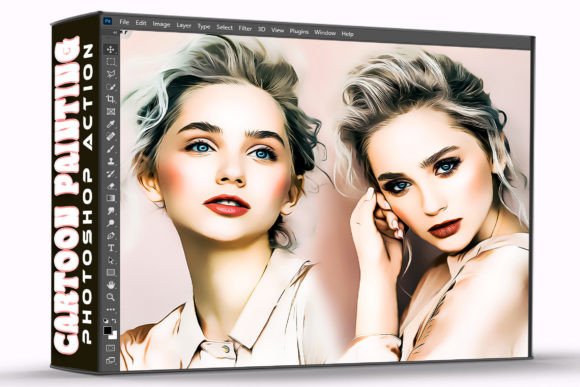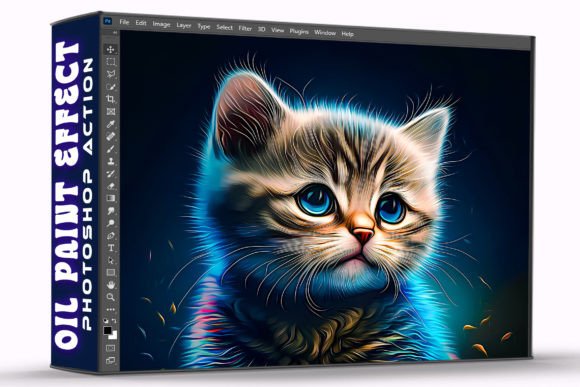
Artistic Cartoon Effect Photoshop Action: Transforming Photos into Creative Assets in One Click
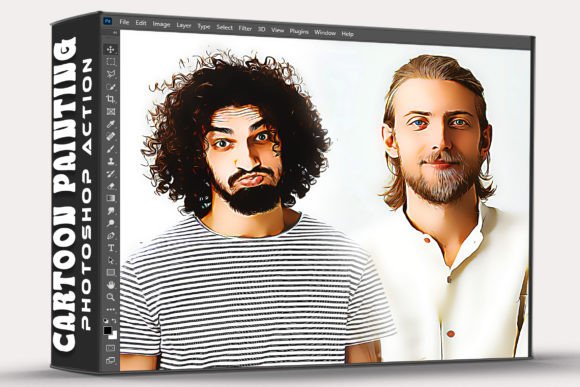
Turning a standard photograph into a stylized illustration usually requires hours of manual painting, complex layer masking, and advanced digital art skills. The Artistic Cartoon Effect Photoshop Action changes this dynamic entirely by automating the most tedious technical steps of digital stylization. Instead of spending an afternoon trying to replicate a hand-drawn aesthetic, you can achieve a professional-grade cartoon look in seconds. This tool is designed for creators who need high-impact visuals without the steep learning curve associated with traditional digital painting. By simply installing the ATN file and playing the action on your open photo, the software handles edge detection, color grading, and texture application automatically.
Real-World Applications for Content Creators and Marketers
The primary value of this automation lies in its ability to solve specific visual problems across different industries. For social media managers and digital marketers, consistency is often more important than perfection. When managing a brand account that utilizes a playful or illustrative aesthetic, creating custom artwork for every post is unsustainable. Using an artistic cartoon effect allows you to maintain a cohesive visual identity across hundreds of posts using existing photography. You can take a standard product shot or a team photo and instantly align it with a campaign’s illustrated theme. This bridges the gap between stock photography and custom branding, making generic images feel bespoke and intentional.
Bloggers and editorial writers also find immense practical use here. Articles about gaming, pop culture, or creative hobbies often require featured images that stand out in crowded feeds. A realistic photo might feel too serious, while a generic vector illustration lacks personality. Applying a cartoon filter creates a unique middle ground that signals creativity to the reader before they even scan the headline. Because the process takes only a moment, writers can experiment with multiple variations to see which style best complements their narrative tone, rather than being locked into a single stock image choice.
Elevating Gaming and Streaming Visuals
The gaming community has embraced stylized photography as a core part of its visual language. Streamers and esports organizations frequently need avatars, thumbnails, and overlay assets that match the vibrant energy of video games. The Artistic Cartoon Effect Photoshop Action serves as a rapid prototyping tool for these assets. Instead of commissioning expensive custom art for every new game release or season, streamers can transform their own webcam photos or in-game screenshots into matching profile pictures and banner art. This is particularly useful for indie developers or small teams who need promotional materials but lack a dedicated concept artist.
For gamers looking to personalize their setups or social profiles, this tool offers a way to create exclusive content. Turning a cosplay photo or a convention snapshot into a stylized portrait preserves the memory while adding a layer of digital fantasy. It transforms everyday documentation into shareable fan art. The speed of the action means you can process entire albums from an event, creating a consistent gallery aesthetic that looks professionally curated rather than hastily assembled.
Considerations Before Applying the Effect
While the one-click workflow is incredibly efficient, understanding how the algorithm interacts with different image types will yield significantly better results. Not every photograph translates perfectly into a cartoon. Images with strong contrast, clear subject separation, and distinct lighting tend to produce the cleanest lines and most appealing color blocks. Photos that are muddy, underexposed, or cluttered with background noise may result in a messy abstraction rather than a polished illustration.
- Resolution Matters: Actions rely on pixel data to detect edges. Starting with a high-resolution source file ensures the final output remains crisp. Upscaling a low-res image after applying the effect often leads to artifacting and blurred details.
- Subject Clarity: Portraits and object-focused shots work best. Wide landscapes with tiny subjects may lose definition during the stylization process because the action struggles to identify focal points amidst complex textures.
- Color Correction First: It is often beneficial to perform basic color correction and exposure adjustments before running the action. The cartoon effect amplifies existing colors; fixing white balance beforehand prevents the final image from looking oversaturated or tinted incorrectly.
Professional Workflow Integration
Design agencies and freelance illustrators can utilize this pack not just as a final output generator, but as a foundational step in a larger workflow. Many professionals use automated actions to establish base layers, saving hours of blocking-in time. After running the Artistic Cartoon Effect Photoshop Action, an artist can paint over the generated result to refine details, fix anatomical quirks, or add custom textures. This hybrid approach combines the speed of automation with the nuance of human artistry. It effectively removes the "blank canvas paralysis" that often slows down creative projects.
For print-on-demand sellers and merchandise designers, this tool opens up new product possibilities. Stylized portraits sell exceptionally well on stickers, phone cases, and apparel. The ability to quickly convert customer-submitted photos into printable art assets streamlines the fulfillment process. Rather than redrawing every pet portrait or family photo from scratch, designers can use the action to get 80% of the way there, focusing their billable hours on customization and quality control. This scalability is essential for businesses that rely on volume without sacrificing perceived quality.
Understanding the Technical Deliverables
When you acquire this pack, you are receiving specific components designed for seamless integration into Adobe Photoshop. The core component is the .ATN file, which contains the recorded sequence of commands. This is the engine that drives the transformation. Accompanying this is a Help File, which provides crucial guidance on installation and troubleshooting. While the process is marketed as simple, reading the help documentation is recommended to avoid common pitfalls like missing brushes or incompatible color modes.
Installation is straightforward but requires attention to detail. You must load the action through the Photoshop Actions panel and ensure any dependent resources are active. Once installed, the workflow is linear: open your photo, select the action, and press play. There is no need to understand the underlying code or layer structure to benefit from the result. However, keeping the original layers intact after processing allows for non-destructive editing later. This flexibility ensures that the action serves as a creative starting point rather than a rigid endpoint.
Balancing Automation with Artistic Intent
It is important to recognize both the strengths and limitations of automated stylization. The Artistic Cartoon Effect Photoshop Action excels at creating bold, graphic interpretations of reality. It is fantastic for grabbing attention, establishing mood, and accelerating production. However, it cannot replace the storytelling capability of a human illustrator when specific narrative details are required. If a project demands precise historical accuracy or subtle emotional expression, the action should be treated as a texture tool rather than a complete solution.
Users should also be mindful of overuse. Because the effect is accessible and fast, there is a temptation to apply it indiscriminately. The most successful applications are those where the cartoon style serves a clear communicative purpose. Whether it is distinguishing a tutorial section in a blog post, creating a recognizable avatar for a streaming channel, or unifying a marketing campaign, the effect should always support the content's goal. When used with intention, this tool empowers adults aged 20–50 to bridge the gap between their photographic resources and their creative vision, making professional-level stylization accessible to everyone regardless of their drawing ability.